Choosing a Smart Power Strip for international markets involves more than comparing prices and outlet counts. Buyers must consider plug formats, input voltage, rated current, grounding, and the devices customers will connect. A compact strip with USB-C ports may suit a hotel desk, while a workshop may need wider spacing for bulky adapters. Small details matter.
The right specifications depend on the destination and use case. Check product labels, technical documents, and compatibility with local electrical systems before placing an order. Confirm that safety certifications apply to the exact model and target market; a familiar logo alone is not enough. Ask suppliers about surge protection ratings, overload safeguards, cable length, materials, and warranty terms. Request samples when possible. Test them.
This guide presents ten practical buying tips for global buyers, from assessing outlet layouts to reviewing quality control and supplier communication. It also considers packaging, shipping, and after-sales support, which can shape the real cost of a purchase. No checklist removes every risk. Product claims may be incomplete, and specifications can vary between models, so verify the details rather than relying on assumptions. A careful comparison takes time. Sometimes, even experienced buyers miss a small label or connector detail. That is worth remembering.
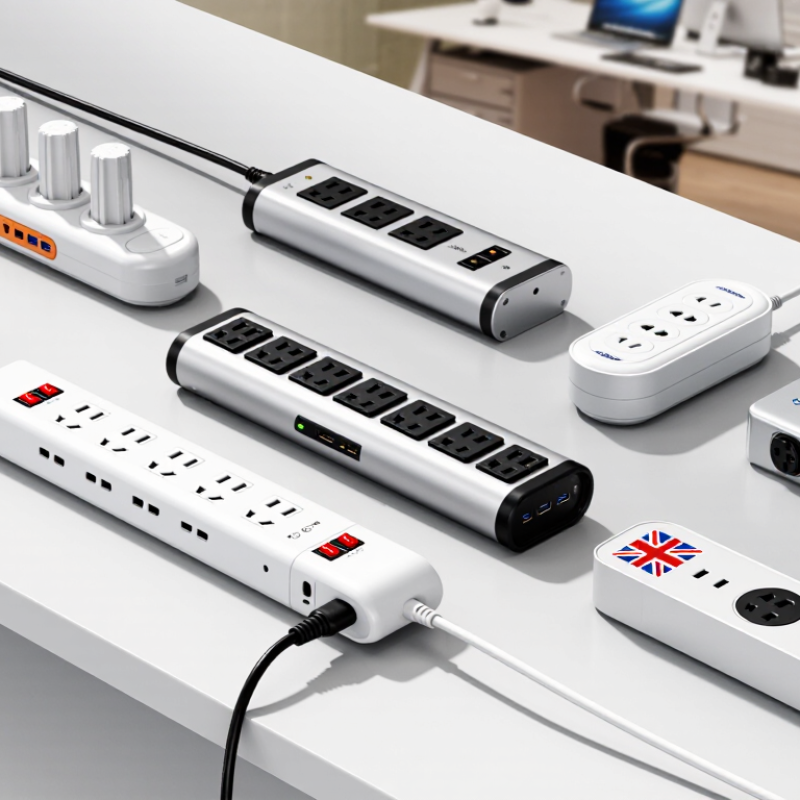
A power strip can fit the socket and still be electrically wrong. Map each destination’s nominal voltage, frequency, and plug configuration before comparing products. For example, Japan commonly uses 100 V, while many European markets use 230 V. A plug adapter changes the connection, not the voltage. Small mismatch. Check twice.
IEC’s World Plugs reference maps 15 plug types, A through O, showing why “international plug” is not a useful specification. Record the required plug and socket type for every target country, then check pin dimensions, grounding, and rated current. IEC 60884-1:2022 covers household and similar plugs and socket-outlets, but it does not replace national requirements. Ask suppliers for test reports identifying the exact standard edition and product configuration. A certificate for one plug variant may not cover another.
Compare the strip’s voltage and frequency markings with the local supply, and confirm that the cord, socket, and any protective components share suitable ratings. An IEC 60884-1 reference alone does not prove complete compliance for every market. Look for evidence of applicable national adoption and independent testing. One detail is easy to miss: a strip may have a suitable plug but an unsuitable voltage rating. Even a tidy sourcing sheet can overlook that. Verify the label on the actual production unit, not only a catalogue image.
A power strip may look simple, but its certification applies to a specific product design, not every item in a seller’s catalog. For North American models, check whether the exact model is certified to UL 1363, the standard for relocatable power taps.
Small details matter. Compare the model number on the strip with the number shown on its certification documents. Check the rating label too: voltage, current, and any stated load limits should be clear and consistent.
Do not rely on a product page that merely says “UL compliant.” Look for a certification mark on the product and verify the listing with the relevant certification organization. Check the cord, plug, and outlet configuration against the documentation; a similar-looking model may have different ratings.
That distinction matters. UL 1363 certification is not a substitute for using the strip within its stated limits, and it does not automatically establish suitability for every country. Buyers sourcing internationally should confirm the applicable local requirements as well.
A label can be reassuring, but it is only a starting point. Paperwork can be incomplete, so ask the supplier for model-specific evidence before placing a large order.
10 Smart Power Strip Buying Tips for Global Buyers
A 15 A rating at 120 V gives 1,800 VA; for a near-resistive load, that is about 1,800 W. The distinction matters: motors and electronic supplies can draw startup surges or have power factors below one. Check the strip’s stated watt limit and each device’s nameplate, not just the outlet count. A heater rated 1,500 W leaves little headroom on a 15 A, 120 V strip. The arithmetic is clean; real loads are less tidy. NFPA’s Electrical Fires report estimates that electrical failure or malfunction was involved in 46,700 U.S. home structure fires annually during 2015–2019. It does not attribute all those fires to power strips, but it underscores why load checks matter.
Tip: Add the devices’ wattages before buying, then leave margin for peaks. For equipment running continuously on a typical U.S. 15 A circuit, the National Electrical Code’s general 80% sizing rule corresponds to 12 A, or 1,440 VA at 120 V. This is not a universal rule for every country or product; confirm local requirements and the strip’s own rating. Compare voltage, current, plug type, and overload protection. Avoid stacking strips. One detail buyers sometimes miss: a high total wattage rating cannot compensate for a lower-rated cord or socket. Check every limit.
At 120 V, power in watts equals volts multiplied by amps. These examples show the calculated load; always follow the power strip’s nameplate rating and applicable electrical requirements.
Check the power strip’s Wi-Fi band before comparing outlets or USB ports. Many models connect through 2.4 GHz Wi-Fi, while some home networks combine 2.4 and 5 GHz under one network name. During setup, a phone using 5 GHz may have trouble finding the strip. Check the manual for setup requirements, and confirm your router can provide the required band. Small detail, big difference.
Compatibility with a smart-home platform is more than seeing its name on a box. Look for the exact model and region in the platform’s supported-device list. Then check what control is available: voice commands, schedules, energy monitoring, or just on-and-off switching. A strip may connect to an app but not expose every outlet separately. That limitation matters if a desk lamp and router need different schedules.
Specifications can be oddly vague, so verify them before buying in bulk. Ask the supplier for the Wi-Fi standard, supported platform, and setup steps for your target market. If possible, test one unit on the intended network first. That can reveal a weak signal behind a cabinet or an app that needs an extra permission. It is not a perfect guarantee, but it is better than assuming compatibility.
USB Power Delivery 3.1 can support up to 240 W through Extended Power Range (EPR), when compatible equipment is used. That figure is a ceiling, not a promise that every USB-C port on a power strip can deliver it. A strip may offer 30 W, 65 W, or another lower output per port. Check the actual port rating, not just a large number on the package. Look for voltage and current details, such as 20 V at 5 A, which equals 100 W. Small print matters.
Also check whether the listed output applies to one port or all USB ports combined. When two devices charge together, available power may be divided or reduced. Your device, charger circuitry, and cable must all support the selected power level; EPR charging requires a suitable cable. One weak link lowers the result. Labels can be annoyingly vague. For a laptop and phone used at the same time, compare the strip’s single-port rating and its total USB output under simultaneous use. Don’t pay extra for a 240 W claim unless the port, cable, and devices you plan to use can actually take advantage of it.
| # | Buying Dimension | What to Check | Practical Guidance |
|---|---|---|---|
| 1 | USB-C power per port | Check the maximum wattage and supported USB Power Delivery profiles for each USB-C port. | Do not assume every USB-C port delivers the same output. A 20 W, 30 W, or 65 W port is below USB PD 3.1’s 240 W maximum, but may be sufficient for phones, tablets, or many laptops. |
| 2 | USB PD 3.1 EPR support | Look for an explicit Extended Power Range (EPR) rating if you need more than 100 W from one USB-C connection. | USB PD 3.1 supports up to 240 W (48 V at 5 A) under EPR. A USB-C connector alone does not indicate EPR or 240 W capability. |
| 3 | Cable compatibility | Confirm the cable is rated for the required voltage and current. | USB-C cable assemblies carrying more than 3 A require electronic marking. For a 240 W EPR connection, use a compatible 5 A EPR-rated cable; the power strip, device, and cable must all support the intended level. |
| 4 | Shared USB output | Read the total USB power rating and the output limits when multiple ports are used simultaneously. | A strip may advertise several USB ports while sharing one power budget. Check the port-combination table to see whether connecting a second device reduces the first port’s output. |
| 5 | AC voltage and frequency | Match the strip’s marked input voltage and frequency to the destination country and connected equipment. | Electrical systems differ by region. Do not assume a power strip is universal or that a plug adapter converts voltage. Verify the ratings on both the strip and each appliance. |
| 6 | Current and load limit | Check the strip’s rated current and maximum load, then compare them with the supply circuit and connected devices. | As a basic calculation, 120 V × 15 A equals 1,800 VA, while 230 V × 10 A equals 2,300 VA. These are examples, not universal limits; follow the strip’s label and local electrical rules, and do not exceed the lowest applicable rating. |
| 7 | Plug and socket compatibility | Verify the plug type, socket format, grounding arrangement, and local approval requirements. | Choose a model designed for the intended market. A physical adapter does not establish grounding compatibility, electrical safety approval, or voltage compatibility. |
| 8 | Surge protection evidence | Check whether surge protection is present and review the stated test standard, protection rating, and status indicator. | Compare documented specifications rather than relying on the phrase “surge protected” alone. Surge ratings and test methods vary; verify that the claimed protection is appropriate for the destination market. |
| 9 | Safety certification and construction | Look for applicable, verifiable safety approvals for the product and destination country, plus clear ratings and instructions. | Certification requirements differ by market and product type. Confirm the exact model’s approval through the relevant certification body or official records; do not treat one country’s mark as automatically valid worldwide. |
| 10 | Operating features and placement | Assess switch design, overload protection, cord length, spacing, heat clearance, and any smart-control functions. | Allow ventilation and keep the strip away from moisture and heat. Smart functions do not increase the electrical load rating; use app or voice controls only as convenience features, not as substitutes for safe installation. |