- Home
- About Us
- Products
- Total Solution
- News
- Blog
- Contact Us
Leave Your Message
-
-
Phone
-
E-mail
-
Whatsapp
-
Whatsapp

A Smart Power Strip is more than a longer outlet bar with a modern label. It monitors connected devices and helps reduce electricity wasted during standby mode. That waste can come from televisions, gaming consoles, printers, chargers, and office equipment. Even when switched off, many devices quietly continue drawing power.
Energy-efficiency expert Amory Lovins often emphasizes, “The cheapest energy is the energy you don’t use.” A Smart Power Strip applies this principle at the outlet. Some models use a master outlet to control several connected sockets. When a computer shuts down, the strip can cut power to its monitor and speakers. Other models rely on timers, motion sensors, or smartphone applications. Wi-Fi versions may also provide energy-use data, though their own electronics consume a small amount of power.
The technology sounds simple. The details matter. Before choosing one, check its joule rating, overload protection, socket layout, and compatibility with sensitive equipment. A timer may save energy, but it can interrupt updates or erase unsaved work. That is an easy mistake. In my experience, the most useful setup begins with devices that truly remain idle for long periods. A home entertainment center is a practical example. An always-on router may be a poor candidate. Smart controls are not automatically efficient, either. Users must configure them carefully and review their habits. This article explains how a Smart Power Strip detects activity, controls outlets, and supports safer, more deliberate energy management.
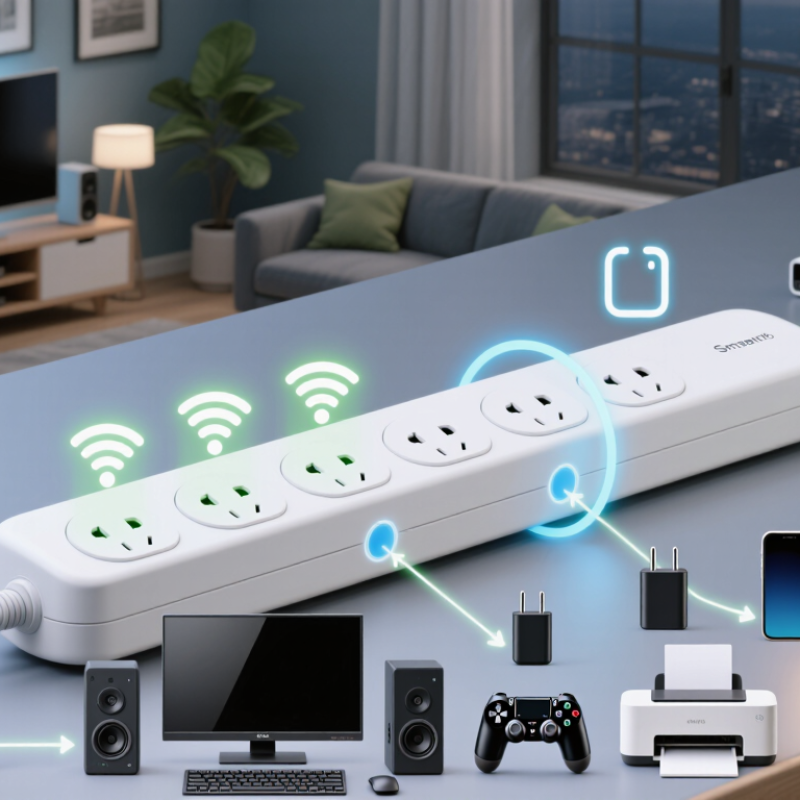
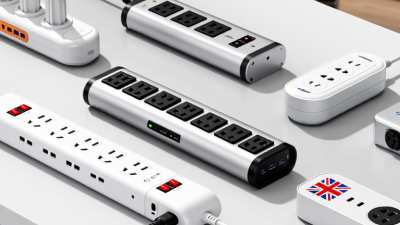
A smart power strip is a multi-outlet device that controls connected appliances electronically. Unlike a basic strip, it can connect to a home network or nearby mobile device. Users may switch outlets remotely, create schedules, or monitor electricity use. The strip becomes a small control point between the wall socket and everyday equipment.
Its core features usually include independently controlled outlets, timer settings, and energy tracking. Some models provide a master outlet that turns related outlets on or off together. For example, a desk lamp, monitor, and speaker can respond when a computer starts. Built-in overload protection is important, while surge protection may provide extra defense against voltage spikes. These functions are not identical. Buyers should check the electrical rating and safety certification instead of trusting vague packaging.
In practical use, scheduling can reduce standby consumption from chargers and entertainment devices. A mobile application may show estimated power usage, but these figures are not always laboratory-accurate. I still compare the reading with the appliance’s rated wattage. Network control also depends on a stable connection. If the network fails, local buttons and automatic schedules may remain available, but this varies by design. A smart power strip should not replace careful load management; high-power heaters and similar appliances require special attention. It is convenient, not magical.
| Data Dimension | Definition or Typical Data | How It Works | Practical Benefit |
|---|---|---|---|
| Definition | A power strip with network connectivity, electronic switching, and software-based control. | An internal controller communicates with a mobile app, web service, or compatible smart-home platform. | Connected appliances can be monitored or controlled without manually reaching the strip. |
| Typical Outlet Configuration | Common models provide 3–6 AC outlets, sometimes with individually controlled sockets and USB charging ports. | Relays or electronic switches open or close power to selected outlets. | Different devices can be turned on or off independently. |
| Connectivity | Wi-Fi is common; some products use another low-power wireless connection or a dedicated hub. | The strip sends status information to an app and receives commands through the local network or cloud service. | Users can control compatible loads remotely when the required network connection is available. |
| Remote Switching | Remote on/off control for the main outlet, individual outlets, or outlet groups, depending on the design. | A command from the app changes the state of an internal switching component. | Useful for lamps, chargers, entertainment equipment, and other suitable loads. |
| Scheduling | Timed schedules can turn outlets on or off at selected times or on recurring days. | The controller compares the current time with stored schedules and activates the relevant switch. | Reduces unnecessary operating time and automates routine tasks. |
| Energy Monitoring | Some models measure voltage, current, power, and accumulated energy consumption. | Sensors estimate electrical usage and transmit readings to the app, usually in watts and kilowatt-hours. | Helps identify high-consumption devices and standby power use. |
| Automation Rules | Rules may use time, energy readings, device status, or signals from a compatible smart-home system. | When a defined condition is met, the controller performs an assigned switching action. | Allows connected equipment to respond automatically to household routines. |
| Overload Protection | A circuit breaker, fuse, or electronic protection system may interrupt power when the rated current is exceeded. | The protective device disconnects or limits current during an overload condition. | Helps reduce the risk of overheating caused by excessive load. |
| Surge Protection | Some models include surge-limiting components, commonly metal-oxide varistors. | The protection circuit diverts or limits short-duration voltage spikes within its specified capacity. | Can provide additional protection against certain transient surges, but does not replace a complete electrical protection system. |
| USB Charging | USB-A and/or USB-C ports may be included for charging small electronics. | An internal power supply converts AC electricity to the lower-voltage DC output required by USB devices. | Reduces the number of separate charging adapters needed at the outlet. |
| Operating Load | The maximum current and power depend on the electrical standard and the strip’s rating; many household models are rated around 10–16 A. | All connected loads share the strip’s total rated capacity, including loads connected through USB ports where applicable. | Prevents users from treating the strip as a source of unlimited power. |
| Standby Consumption | The networking and control electronics consume a small amount of electricity while the strip remains connected. | The controller stays partially active so it can receive commands and maintain network communication. | Remote availability is maintained, although it creates a small continuous energy cost. |
| Manual Control | A physical button or switch is normally provided for local operation. | Pressing the control sends a local command to change the outlet state. | The strip remains usable if the app, internet connection, or wireless network is unavailable. |
| Network Dependency | Remote features may require Wi-Fi, an account, an app, or an internet connection, depending on the system. | Commands travel through the supported communication path to the strip’s controller. | Connectivity requirements should be checked before installation. |
| Suitable Applications | Lighting, office equipment, chargers, televisions, routers, and other devices that can safely be switched by removing power. | The strip applies programmed or manual switching commands to selected outlets. | Provides centralized control, scheduling, and basic energy visibility for everyday electrical devices. |